Introduction
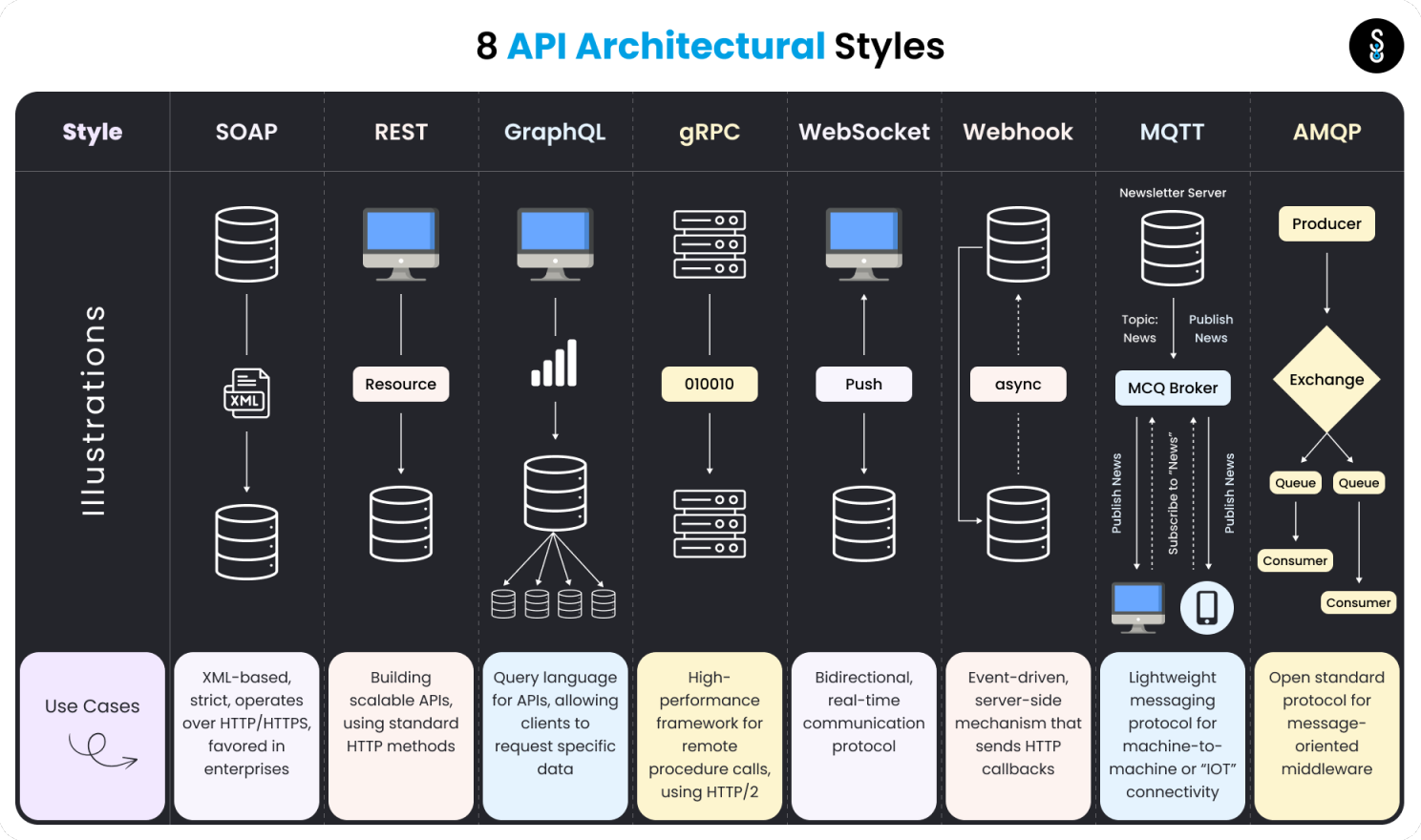
As a Data Engineer (DE), you will always find yourself working with APIs. Understanding APIs is an essential skill for any DE. Throughout my time learning at university and working at various companies, I’ve had the opportunity to work with many different styles of APIs. Most of the tasks involving APIs in data engineering revolve around automating data retrieval. However, in some companies, you may also need to write APIs according to specific requirements (this can sometimes be considered more of a backend task). Today, I want to share the knowledge I’ve gained about APIs in data engineering through my experiences.
What are APIs
An API, or Application Programming Interface, is a set of rules and protocols that allows different software applications to communicate with each other. In simpler terms, APIs are like a bridge that connects two systems, enabling them to exchange data or functionality.
API architecture styles
API architectural styles dictate how applications communicate with one another. The choice of API architecture impacts how APIs work, their efficiency, and their use cases. According to Postman’s 2023 State of the API report, certain API protocols are more popular and widely adopted today.
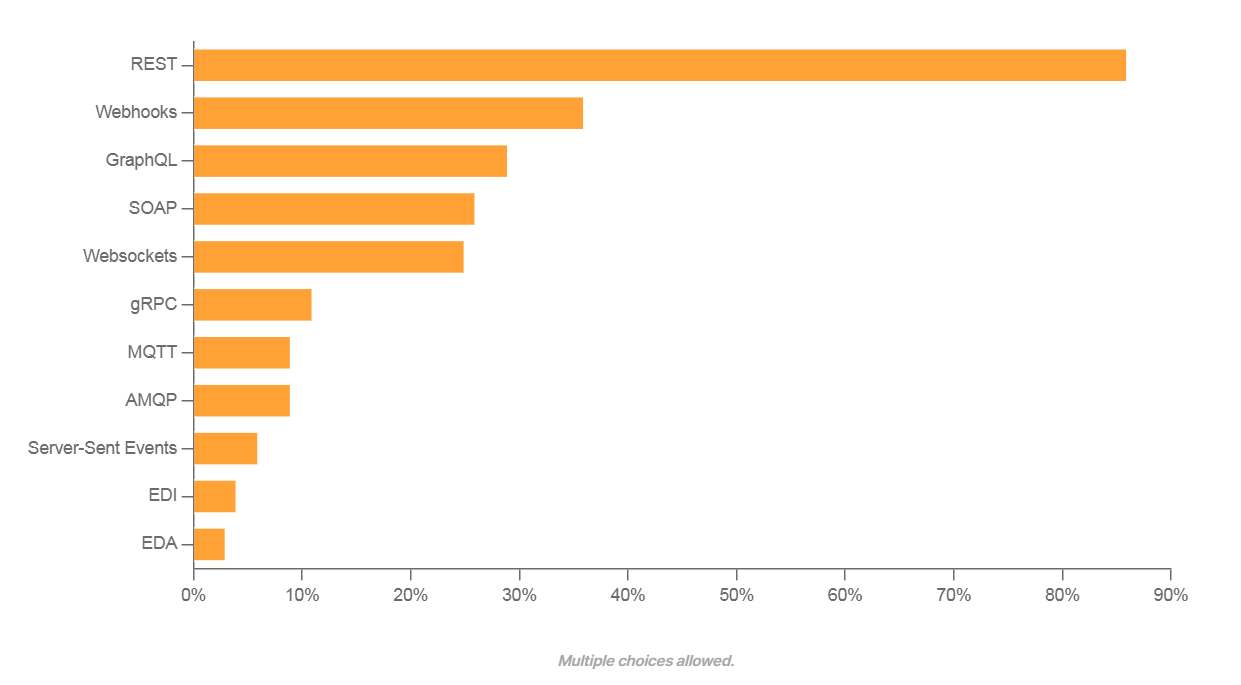
In the early stages of my career, REST APIs were the go-to option. While I haven’t worked with every API architecture style out there, I have hands-on experience with REST, WebSockets, GraphQL, and Webhooks. These styles are among the most-used in the industry, so I’ll focus on these in this post.
REST
REST (Representational State Transfer) is an architectural style that leverages standard conventions and protocols, making it easy to understand and implement. REST’s stateless nature and reliance on standard HTTP methods have made it a popular choice for building web-based APIs.
REST systems use standard HTTP methods:
- GET: Retrieve a resource.
- POST: Create a new resource.
- PUT/PATCH: Update an existing resource.
- DELETE: Remove a resource.
Use Cases
- Web Services: Many web services expose their functionality via REST APIs, allowing third-party developers to integrate and extend their services.
- Integration Between Systems: Systems within an organization can communicate and share data using REST APIs.
Example
- Request:
https://api.example.com/users/{id} - Response:
{
    "id": 21012000,
    "name": "Duyen V. Mai",
    "email": "vanduyen.mai@gmail.com",
    "created_at": "2024-08-01T12:34:56Z"
}
GraphQL
Unlike REST, which uses multiple endpoints for each resource and requires multiple requests to obtain interconnected data, GraphQL operates with a single endpoint. It allows users to specify exactly what data they need and returns the requested data in a single query.
Use Cases
- Flexible Frontends: Ideal for applications (especially mobile) where bandwidth is crucial, minimizing the data fetched from the server.
- Real-time Applications: With its subscription system, GraphQL is excellent for applications needing real-time data, like chat applications or live sports updates.
- Version-Free APIs: In REST, you often need to version your APIs when changes are introduced. With GraphQL, clients request only the data they need, so adding new fields or types doesn’t create breaking changes.
Example
- Request:
https://api.example.com/graphql - Response:
{
  "data": {
    "user": {
      "name": "Duyen V. Mai",
      "email": "vanduyen.mai@gmail.com",
      "posts": [
        {
          "title": "How To Build A Data Pipeline (Part 1 - Dagster)",
          "content": "Setup Dagster and PostgreSQL on Docker",
          "created_at": "2024-02-01T12:34:56Z",
          "url": "https://negordyh.netlify.app/works/dbt/"
        },
        {
          "title": "How To Build A Data Pipeline (Part 2 - DBT)",
          "content": "Integrating DBT with Dagster",
          "created_at": "2024-03-08T09:21:34Z",
          "url": "https://negordyh.netlify.app/works/dagster/"
        }
      ]
    }
  }
}
Websockets
WebSockets provide a full-duplex communication channel over a single, long-lived connection, allowing real-time data exchange between a client and a server. This is ideal for interactive and high-performance web applications.
Use Cases
- Online Gaming: Real-time multiplayer games where players' actions must be immediately reflected to other players.
- Financial Applications: Stock trading platforms where stock prices need to be updated in real-time.
- Notifications: Applications where users need to receive real-time notifications, such as social media platforms or messaging apps, chat bots.
Example
- Request:
https://api.example.com/graphql - Response:
{
  "type": "message",
  "content": "Welcome to the chat!",
  "user": "Server"
}
Webhooks
A Webhook is a user-defined HTTP callback that is triggered by specific events in a web application, enabling real-time data updates and integrations between different systems.
Use Cases
- Social Media Integrations: Receiving notifications about new posts, mentions, or other relevant events on social media platforms.
- Continuous Integration and Deployment (CI/CD): Triggering builds and deployments when code is pushed, or a pull request is merged.
Example
- Request: https://ci.example.com/deploy
- Response:
{
  "ref": "refs/heads/main",
  "repository": {
    "name": "example-repo",
    "url": "https://github.com/example-repo"
  },
  "pusher": {
    "name": "Duyen V. Mai",
    "email": "vanduyen.mai@gmail.com"
  },
  "head_commit": {
    "id": "abc123",
    "message": "[ADD] - new feature",
    "timestamp": "2024-08-01T12:34:56Z"
  }
}
Security and authentication
When working with APIs, securing data and controlling access are paramount. Common methods include:
- API Key Authentication: A unique key provided by the server is used to authenticate requests, often identifying the client application rather than the user.
Authorization: ApiKey your_api_key
- OAuth: A widely-used authorization framework that allows secure, token-based access to resources.
Authorization: Bearer {access_token}
- JWT (JSON Web Tokens): Encodes claims between two parties, often used for secure API interactions.
Authorization: Bearer {jwt_token}
- Basic Auth: Uses a simple encoding of the username and password.
Authorization: Basic {base64encoded(username:password)}
Rate limits
Rate limits are essential for preventing abuse and ensuring the availability of the API for all users. These limits restrict the number of API requests a client can make within a specific timeframe. Handling rate limits involves:
- Batching Requests: Combining multiple data requests into a single API call.
- Throttling: Introducing delays between requests to stay within allowed limits.
- Graceful Handling: Implementing mechanisms to handle rate limit errors and retrying requests after a delay.
Pagination
Pagination is crucial in API design to handle large datasets efficiently and improve performance. Several pagination techniques are commonly used:
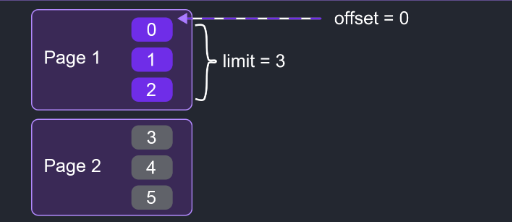
- Offset-based Pagination: Defines the starting point and the number of records to return.
- Example:
GET /orders?offset=0&limit=3 - Pros: Simple to implement.
- Cons: Inefficient for large offsets.
- Example:
- Cursor-based Pagination: Uses a unique identifier to mark the position in the dataset.
- Example:
GET /orders?cursor=xxx - Pros: Efficient for large datasets.
- Cons: More complex to implement.

- Example:
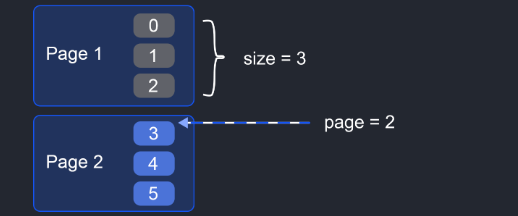
- Page-based Pagination: Specifies the page number and size of each page.
- Example:
GET /items?page=2&size=3 - Pros: Easy to use.
- Cons: Performance issues with large page numbers.
- Example:
- Time-based Pagination: Uses timestamps or dates to paginate through records.
- Example:
GET /items?start_time=xxx&end_time=yyy - Pros: Ensures no records are missed in time-ordered datasets.
- Cons: Requires consistent timestamps.
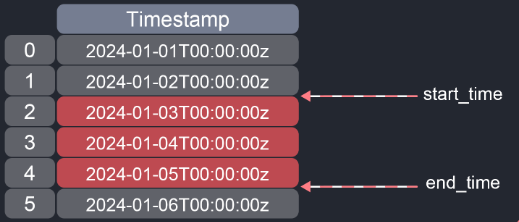
- Example:
- Keyset-based Pagination: Filters the dataset using a key, typically a primary key or indexed column.
- Example:
GET /items?after_id=102&limit=3 - Pros: Efficient and avoids performance issues.
- Cons: Requires a unique and indexed key.
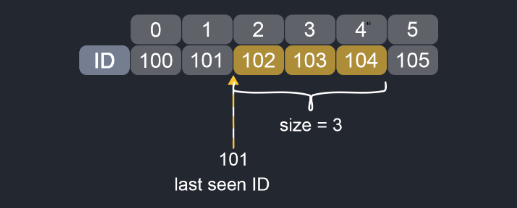
- Example:
- Hybrid Pagination: Combines multiple techniques for complex datasets.
- Example: Combining cursor and time-based pagination.
GET /items?cursor=abc&start_time=xxx&end_time=yyy - Pros: Best performance and flexibility.
- Cons: Complex to implement.
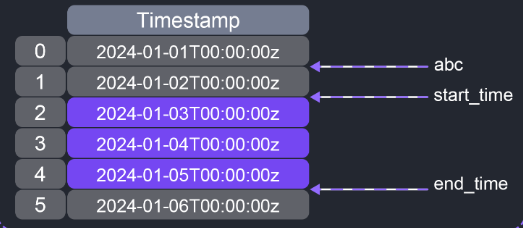
- Example: Combining cursor and time-based pagination.
Conclusion
APIs are a fundamental part of data engineering, enabling automation, integration, and real-time data exchange across various systems. Understanding different API architectures, security measures, rate limits, and pagination techniques will empower you to build robust and scalable data pipelines. I hope this overview has provided you with valuable insights into APIs in data engineering. In the next post, we’ll dive deeper into hands-on practice with APIs. See yah!